Adding Contracts and Preauthorized Payment in MYMC
Pre-authorization refers to a formal arrangement in which an individual or organization grants prior consent to a third party to debit funds from a designated bank account or payment method for agreed-upon amounts, purposes, and time periods.
The transaction is initiated only in accordance with the terms authorized in advance.
Steps for pre-authoized accounting fees:
1. Read the cheque properly:
A Canadian cheque contains standardized information that identifies the account holder, financial institution, and payment details. Each section serves a specific purpose and must be read accurately.
When a cheque is provided for pre-authorization, it is typically marked “VOID” and is used solely to confirm banking details. No date, amount, or signature is required in this case.
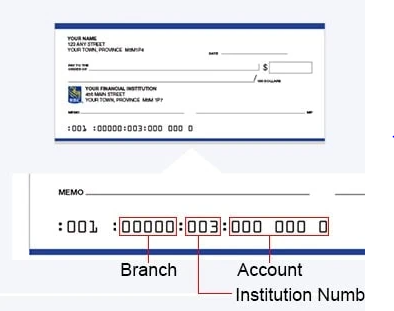
Image: sample cheque highlighting transit, institution and account number respectively
A. Account holder name/ Company name
B. The important numbers (bottom of the cheque)
These are what the company actually needs:
From left to right (Canada):
1. Transit number/branch number (5 digits)
• Identifies your bank branch
2. Institution number (3 digits)
• Identifies the bank (e.g., TD, RBC, Scotiabank etc.)
3. Account number
• Your specific bank account
• Most important part
Together, the transit + institution + account number allow the company to withdraw funds.
2. Date of withdrawal for accounting fees:
- The withdrawal shall occur on a fixed schedule, either on the 1st or the 15th day of each month, as selected by the account holder/ clients.
- If the selected withdrawal date falls on a weekend or statutory holiday, the fees will be processed on the next business day.
- The authorized amount will be withdrawn in accordance with the terms outlined in the agreement.
Receivables: Receivables consist of two divisions each addressing distinct terms and obligations.
1. Contracts: This contract is structured into two subdivisions
Subdivision A. Add contract:
To add new contracts:
– Receivables>Contracts>Add contract>Select template as per the number of trucks clients have+how you receive the paperwork either paper-based or digitally
(Note: contract name/description will be auto-filled)
– Start date (one month behind): The start date shall be retroactive to one (1) month later to the processing date.
For instance: if we are processing clients’ paperwork beginning Jan 2026; withdrawal would commence from Feb 1/15.2026 depending on the day clients’ chose.
– Frequency is “monthly”
– Select day: THR have two options whether “1st” or “15th” (ask clients’ preference for date of withdrawal among the afforementioned two dates.)
Subdivision B. Edit preauthorized payment: To edit preauthorized payment:
– Receivables>Contracts>Edit pre-authorized payment>Frequency:“monthly”>select day “1st or 15th every month”>Authorized limit> next pre-authorized payment date the clients chose> fill up the routing/transit and bank account number from the clients’ cheque
– authorized limit: 3 months accounting fees is CAP/maximum/upper limit of an amount
For instance if clients’ accounting fees goes NSF for a month of withdrawal, the system will deduct 2 months accounting fees the following month or the three the next month and after 3 months, it will be suspended.
2. Transactions: Add invoice and add payment
